TranslateNow AI Translator app for iPhone — translate 135+ languages with voice cloning, AR camera translation, document translation, and offline mode.
AI Translator with Voice Cloning. Sound Like You.
Translate 135+ Languages with AR Translation, Document Translation, Writing Tools, System Translator & Offline Mode
TranslateNow translates 135+ languages with voice cloning, AR real-time overlays (ARKit), document translation (PDF/DOCX/TXT), real-time AI conversations, 5 writing tools, 9 tones, camera OCR, a keyboard for any app, Siri, widgets, and offline on-device translation.
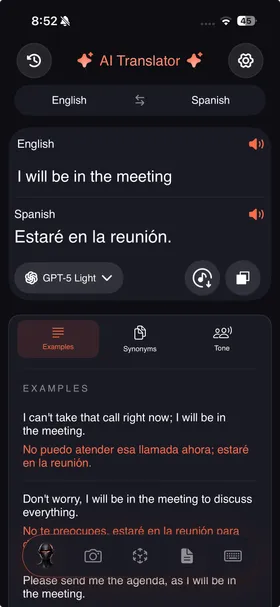
Nine AI-Powered Translation Modes
Voice, text, camera, AR, documents, keyboard, system translator, Siri, and offline. Features that Google Translate and DeepL don't have.
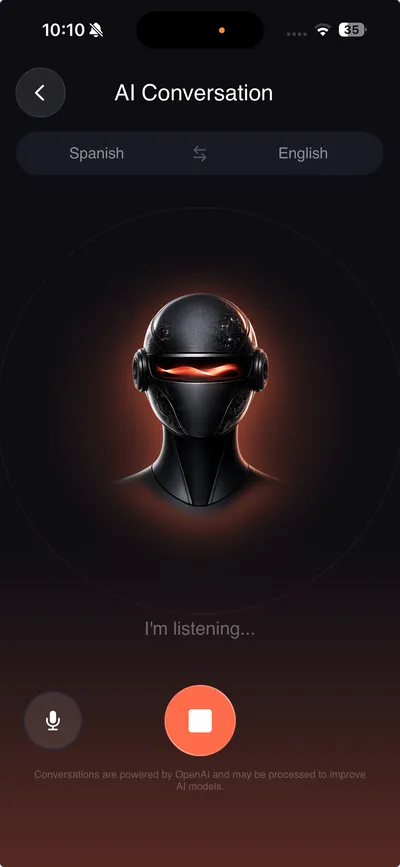
Real-Time AI Conversations
Bidirectional voice translation via OpenAI Realtime API. Auto-detects your language, translates, and speaks back. 7 neural voices. Record & export as .m4a.
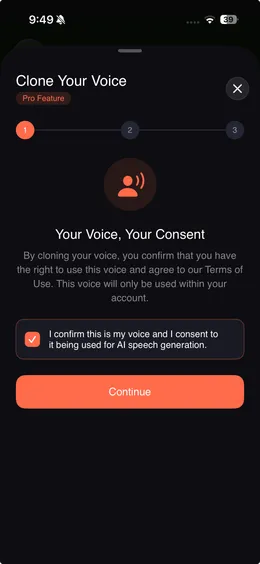
Voice Cloning
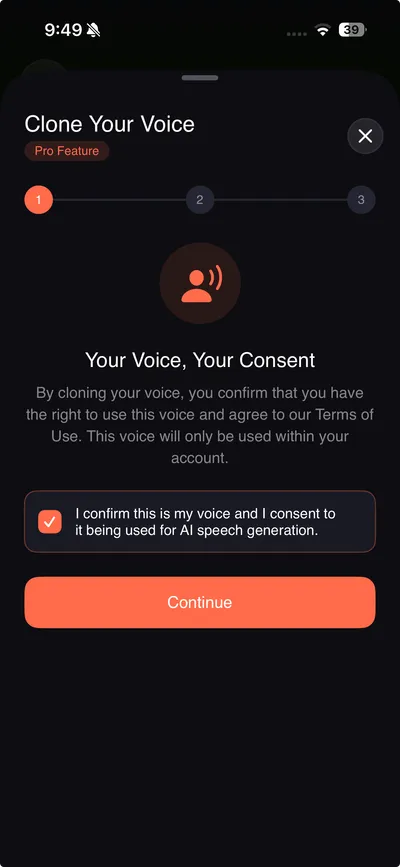
Record 10 seconds. ElevenLabs creates a neural clone of your voice that speaks translations in 135+ languages. Adjust speed 0.5x-2x. Choose male or female.
5 AI Writing Tools
Modify text before translating — fix grammar, adjust tone (5 options), change length, reformat as bullets/summary, or restyle to academic/poetic/persuasive.
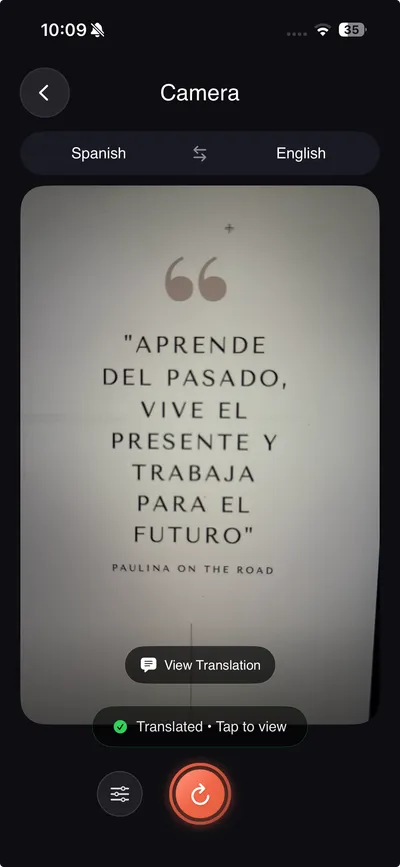
Camera OCR Translation
Point at signs, menus, labels, or documents. Vision framework OCR with hybrid GPT-4o routing for non-Latin scripts. Live camera or photo upload.
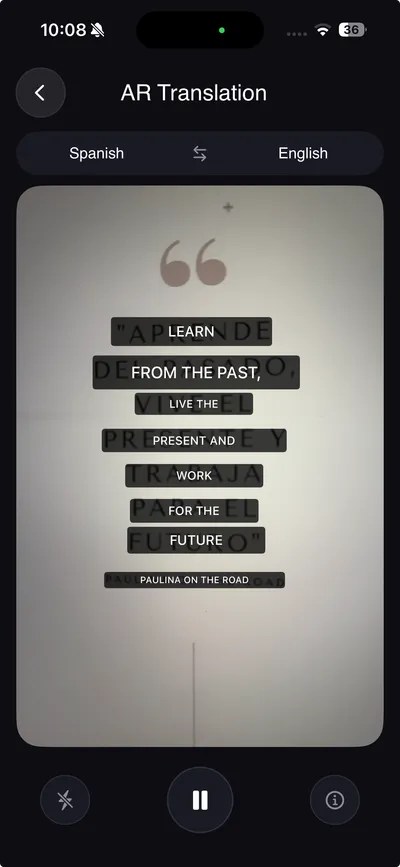
AR Real-Time Translation
ARKit-powered 3D floating translation cards anchored in the real world. Glassmorphism overlays with haptics, TTS, and tap-to-copy. Latin scripts supported.
Document Translation
Import PDF, DOCX, TXT, or photos. AI translates every text block and reconstructs the output preserving original layout. Full RTL support for Arabic, Hebrew, Urdu.
Built-In Keyboard Translator
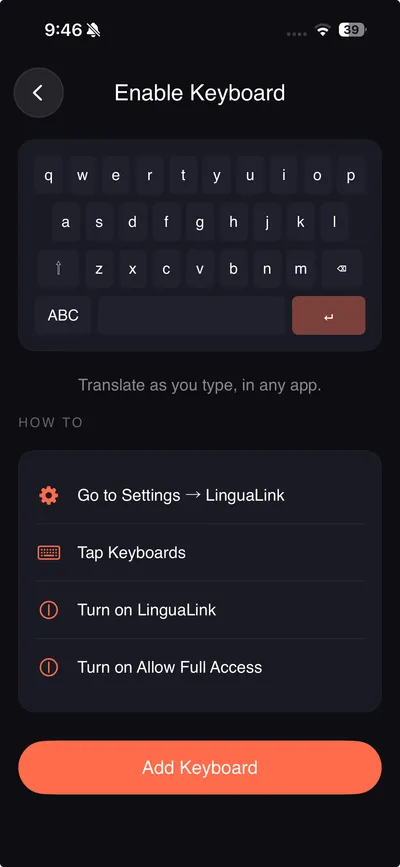
iOS keyboard extension that works in iMessage, WhatsApp, Instagram, Telegram, email — every text field on your iPhone. Type yours, sends theirs.
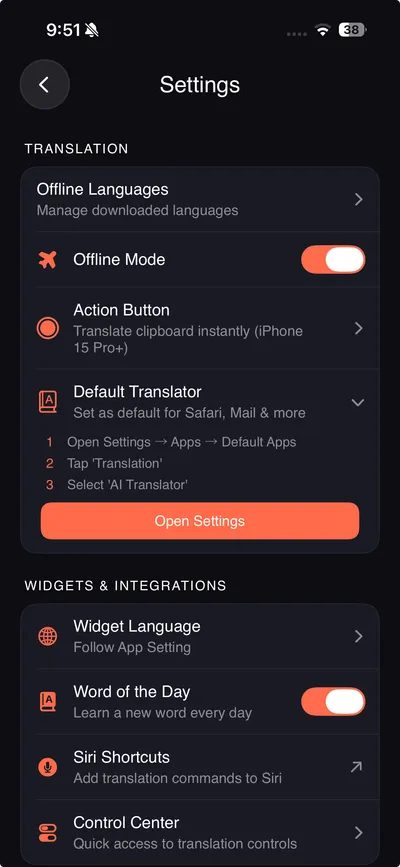
Offline On-Device Translation
59 languages via ML Kit on-device translation. Download packs once (5-50 MB). Zero server calls. All processing stays on your iPhone.
System Default Translator
iOS 18.4+: Set TranslateNow as your iPhone's system translator. Select text in Safari, Mail, Messages — "Translate" runs through TranslateNow.
How to Translate with TranslateNow in 3 Steps
From thought to translated speech in under two seconds — powered by GPT-4o and on-device ML.
Speak, Type, Snap, or Point
Voice input, text, camera OCR, AR overlay, document import, or keyboard — six input modes, zero friction.
AI Reads Between the Lines
GPT-4o contextualizes tone, intent, and cultural nuance. Choose from 9 tones and 5 writing tools before translating.
Communicate Like a Local
135+ languages. Online or offline. In your own cloned voice — with pronunciation, examples, and synonyms.
See TranslateNow in Action
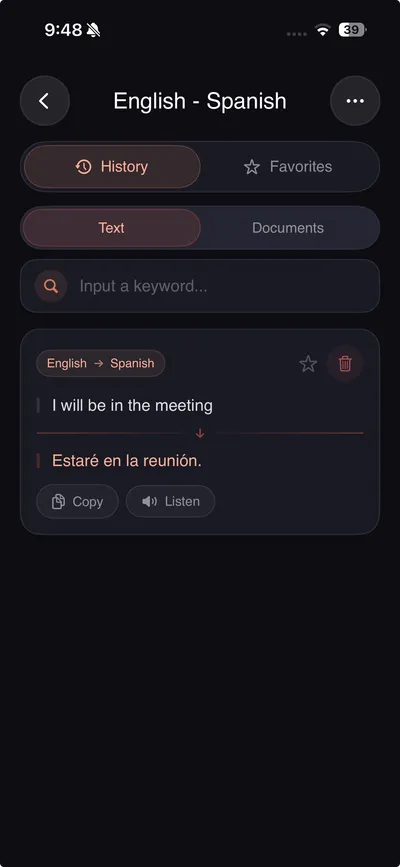
Powerful AI translation tools — voice cloning, camera, AR, documents — in a premium dark interface.
Your Voice. Every Language.
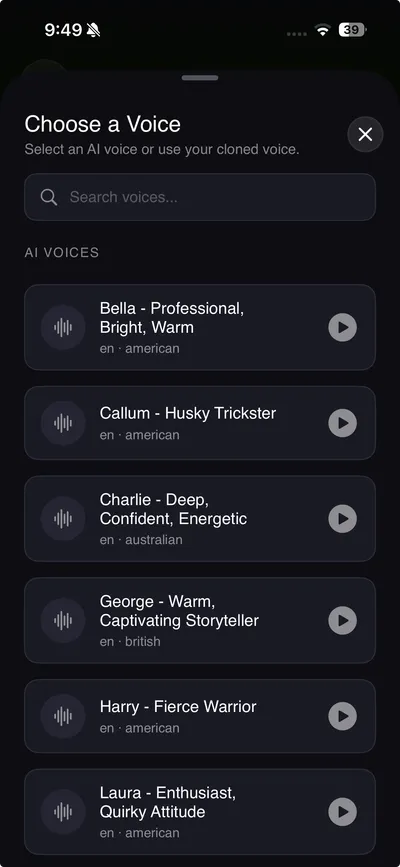
ElevenLabs neural voice synthesis creates an AI replica of your voice. Record a 10-second sample. Adjust playback speed from 0.5x to 2x. Choose male or female voice gender. Streaming PCM for low-latency playback in conversations — non-streaming MP3 for history replay.
- Neural voice synthesis with natural intonation via ElevenLabs
- Playback speed control from 0.5x to 2x
- Male and female voice gender options
- Streaming PCM (~75ms latency) for live conversations
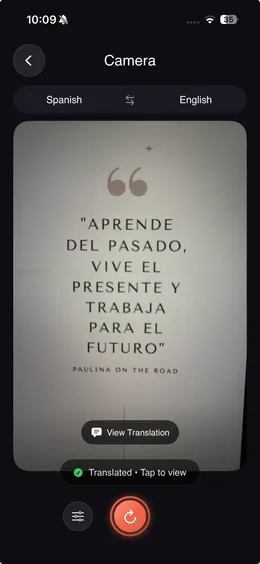
Point. Snap. Understand.
Two modes in one screen — camera OCR for instant snapshots and AR mode for live 3D overlays. Camera uses Apple Vision framework for text detection, with hybrid GPT-4o routing for non-Latin scripts (Hindi, Arabic, CJK). AR mode overlays glassmorphism translation cards via ARKit SceneKit.
- Live camera + photo upload + AR scan modes
- ARKit 3D overlays with glassmorphism cards anchored in world space
- Hybrid Vision + GPT-4o routing for non-Latin scripts
- Signs, menus, documents, medicine labels, receipts
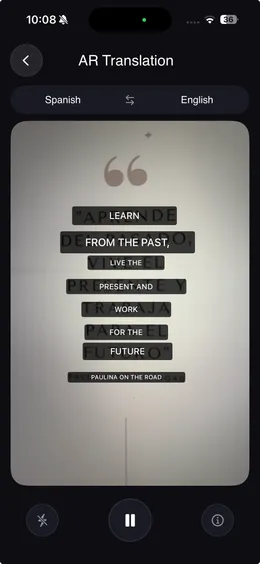
See Translations in the Real World.
Point your camera at any text and watch translations float in 3D space. ARKit SceneKit renders glassmorphism translation cards anchored to real-world surfaces. Translations stay locked in place as you move — pan, tilt, walk around. Supports signs, menus, labels, and documents in 135+ languages.
- Real-time AR overlays powered by ARKit SceneKit
- Glassmorphism 3D cards anchored in world space
- Translations persist as you move the camera
- Works with signs, menus, medicine labels, storefronts
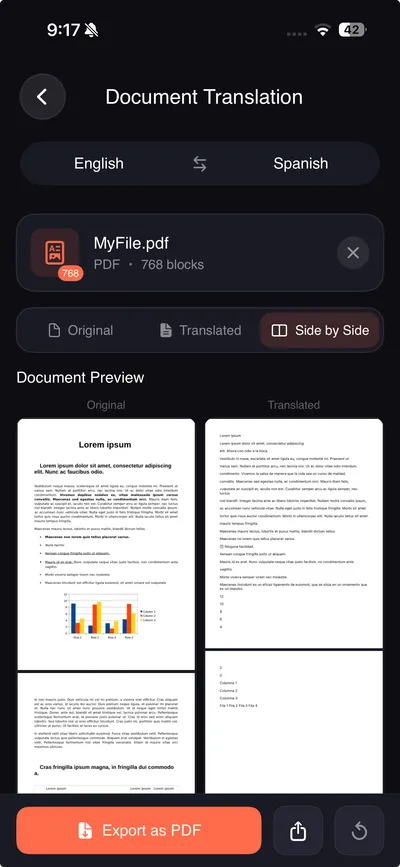
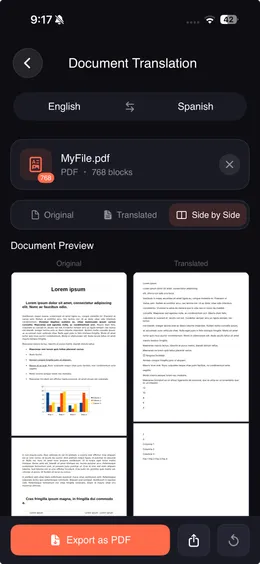
Translate Entire Documents. Layout Intact.
Import PDF, DOCX, TXT, or photos. The document parser extracts every text block. GPT-4o translates each block. The reconstructor rebuilds the document preserving original formatting, fonts, and layout — including RTL languages.
- PDF, DOCX, TXT, and photo document support
- Layout-preserving reconstruction engine
- Full RTL support — Arabic, Hebrew, Urdu
- Batch processing with page-by-page progress tracking
- Document history with thumbnails and re-export

Talk Naturally. AI Translates Instantly.
Powered by the OpenAI Realtime API over WebSocket — bidirectional voice translation with automatic language detection. Speak in any of 135+ languages. The AI detects your language, translates instantly, and responds with streaming neural audio. Record sessions and export as .m4a.
- Bidirectional voice translation across 135+ languages
- Auto-detects which language is being spoken — zero setup
- 7 neural AI voices: Coral, Alloy, Echo, Fable, Onyx, Nova, Shimmer
- Record & export conversations as .m4a audio with pre-roll capture
- Live Activity on Lock Screen & Dynamic Island during sessions
- Echo prevention & noise detection for clean translations
Refine Before You Translate
Five AI writing tools modify your text before translation — fix grammar, adjust tone, change length, reformat, or restyle. No other translator has this.
Grammar
Auto-fix spelling, tense errors & agreement
Tone
Friendly · Professional · Funny · Flirty · Simplified
Length
Concise (40-60%) or Extended (150-200%)
Format
Summary · Key Points · Bullet List
Style
Academic · Creative · Poetic · Persuasive
Translate Offline. Nothing Leaves Your Phone.
Download language packs once over WiFi (5-50 MB each). From that point, translation runs entirely on-device via ML Kit — no server calls, no data transmitted, no cloud processing. 59 languages available for offline use.
- 59 languages available for on-device ML Kit translation
- Language packs 5-50 MB each — download once, use forever
- Zero data transmitted in offline mode — full local processing
- Automatic offline fallback when connectivity drops
- Batch download all languages or pick individually
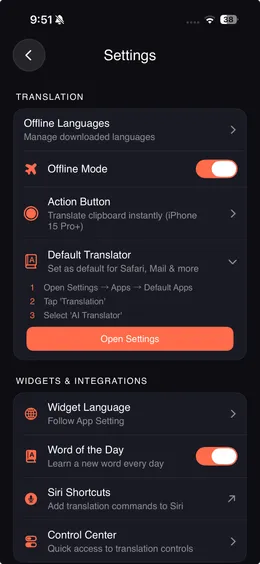
AI That Understands Context, Tone & Culture
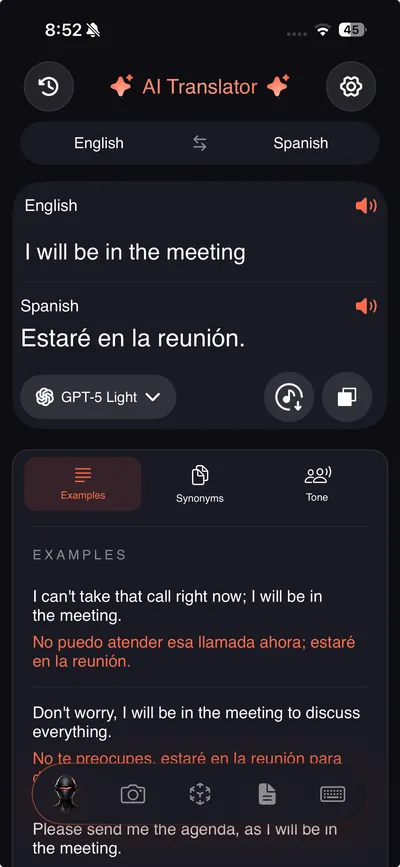
GPT-4o powers every translation with contextual intelligence — examples, synonyms, 9 tones, transliteration, and 7 distinct neural voices.
AI Contextualization
Every translation returns usage examples, synonyms, and tone variations powered by GPT-4o.
9 Translation Tones
Standard, Formal, Casual, Friendly, Professional, Simplified, Literary, Funny, and Flirty.
Transliteration Engine
Romanized pronunciation for every non-Latin script — Japanese, Korean, Chinese, Arabic, Hindi, Russian, Thai, Greek, Hebrew.
7 Neural AI Voices
Coral, Alloy, Echo, Fable, Onyx, Nova, and Shimmer — seven distinct voice personalities via OpenAI.
Speech-to-Text Input
On-device speech recognition feeds directly into the translation pipeline. Handles punctuation and pauses.
Conversation Recording & Export
Record AI conversation sessions and export as .m4a audio. User voice + AI voice captured chronologically.
30 App Languages
The app is localized in 30 languages including Hindi, Spanish, French, German, Japanese, Korean, Chinese, Arabic, Hebrew, and more.
Speed Control (0.5x – 2x)
Adjust voice playback speed for both cloned voices and system TTS. Slow down to learn, speed up for reference.
Deep iOS Integration — Not Just an App
Widgets, Siri, Control Center, Dynamic Island, Spotlight, system-wide translator. TranslateNow is woven into every layer of iOS.
Home Screen Widgets
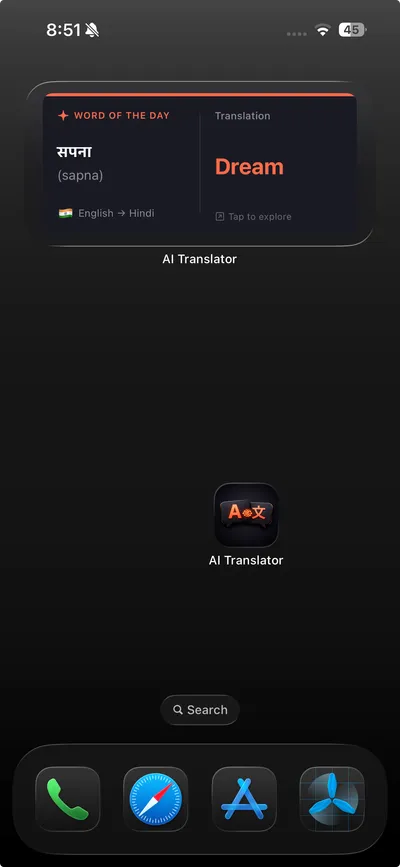
Quick Translate, Recent Translations, and Word of the Day — three widgets that translate directly from your Home Screen.
Control Center (iOS 18+)
Camera, Voice, and Text Translate controls added to iOS 18 Control Center. One-tap access from any screen.
Live Activities & Dynamic Island
Active AI conversation and document translation sessions persist on Lock Screen and Dynamic Island with real-time progress.
Siri Shortcuts (5 Actions)
"Hey Siri, translate with TranslateNow." Five voice-triggered intents: translate text, clipboard, conversation, camera, download.
Spotlight Search Index
Your 50 most recent translations are indexed in CoreSpotlight. Search any past translation system-wide.
Word of the Day
AI-generated daily vocabulary with pronunciation and translation. Delivered via Home Screen widget, powered by GPT-4o-mini.
System Default Translator (iOS 18.4+)
Set TranslateNow as your iPhone's default translation engine. Translate in Safari, Mail, Messages via the system menu.
Universal Deep Linking
The lingualink:// URL scheme connects widgets, Siri, Spotlight, and Control Center directly to the right feature.
Built for Real Life
From airports to classrooms, boardrooms to family dinners — translation that actually works in every context.
International Travelers
Translate street signs with AR, menus with camera, and conversations with voice — with or without internet.
Business Professionals
Translate contracts and PDFs preserving formatting. Adjust tone to Professional for emails. Clone your voice for presentations.
Language Students
AI contextualization provides examples and synonyms — not textbook output. Transliteration for non-Latin scripts. Word of the Day widget.
Cross-Language Messaging
The keyboard extension translates as you type in WhatsApp, iMessage, Instagram, Telegram — any iOS app with a text field.
Privacy-Conscious Users
Offline mode translates 59 languages entirely on-device. No server calls, no cloud storage, no data collection.
Multilingual Families
Bridge languages between generations. Clone a family member's voice so grandparents hear translations in a voice they recognize.
Loved by Users Worldwide
Real reviews from real people using TranslateNow every day.
"The voice cloning blew my mind. I recorded my voice once and now it speaks Japanese in my voice. My hosts in Tokyo couldn't believe it wasn't me speaking."
"The keyboard translator is a game-changer for LinkedIn and email. I reply in Italian without switching apps. Document translation saved hours on contracts — layout perfectly preserved."
"Finally a translator that doesn't sound like a textbook. The writing tools let me adjust tone before translating — my French essays actually sound natural now. The AI examples are incredible."
TranslateNow vs Google Translate vs DeepL
22 features side by side — see what basic translators are missing.
| Feature | TranslateNow | Google Translate | DeepL |
|---|---|---|---|
| Voice Cloning (Your Voice) | | | |
| AR Real-Time Translation (ARKit) | | | |
| Document Translation (PDF/DOCX/TXT) | | | |
| AI Writing Tools (5 Built-In) | | | |
| Keyboard Translator (Any App) | | | |
| System Default Translator (iOS 18.4+) | | | |
| iOS Widgets (3 Types) | | | |
| Control Center Controls (iOS 18) | | | |
| Siri Shortcuts (5 Actions) | | | |
| Live Activities / Dynamic Island | | | |
| Spotlight Search Index | | | |
| AI Context + Examples + Synonyms | | | |
| Transliteration (Non-Latin Scripts) | | | |
| 9 Translation Tones | | | |
| 7 Neural AI Voices | | | |
| Conversation Recording (.m4a) | | | |
| Speed Control (0.5x-2x) | | | |
| Word of the Day Widget | | | |
| AI Conversations (Realtime API) | | | |
| Camera OCR Translation | | | |
| Offline On-Device Translation | | | |
| 135+ Languages | | | 30+ |
Frequently Asked Questions
Everything you need to know about TranslateNow — features, pricing, privacy, and iOS integration.
TranslateNow is an AI-powered translation app for iOS that supports 135+ languages with voice cloning, AR translation, document translation, camera OCR, a keyboard extension, AI writing tools, and offline mode. It also integrates with Siri Shortcuts, Home Screen widgets, Control Center, Live Activities, Dynamic Island, Spotlight search, and the iOS 18.4+ system translator API. Developed by Coachie AI.
Voice cloning lets you record a 10-second voice sample that ElevenLabs uses to create an AI replica of your voice speaking in any of 135+ languages. You can also upload an audio file instead of recording. Choose male or female voice gender, adjust playback speed from 0.5x to 2x, and hear translations in your own voice with natural intonation. Voice cloning is a Pro feature.
AR Translation uses ARKit to detect text through your iPhone camera and overlays 3D floating glassmorphism translation cards anchored in real-world space via SceneKit. Point your camera at signs, menus, or documents — translations appear floating in 3D space. Tap any card to copy text, hear TTS pronunciation, or feel haptic feedback. Translations persist as you move your camera.
Yes, TranslateNow translates PDF, DOCX, TXT, and photo documents with layout preservation. The parser extracts every text block, GPT-4o translates each one, and the reconstruction engine rebuilds the document keeping original formatting, fonts, and layout intact. Full RTL support is included for Arabic, Hebrew, and Urdu.
Yes, 59 languages are available for fully offline, on-device translation via Google ML Kit. Download language packs once over WiFi (5-50 MB each), then translate anywhere without internet. Zero data is transmitted — all processing stays on your iPhone.
The keyboard translator is a built-in iOS keyboard extension that works inside every app with a text field — iMessage, WhatsApp, Instagram, Telegram, LinkedIn, Gmail, Slack, and more. Type in your language, and the keyboard translates and sends in the target language without switching apps.
TranslateNow includes 5 AI writing tools that modify text before translation: Grammar (auto-fix spelling and errors), Tone (Friendly, Professional, Funny, Flirty, Simplified), Length (Concise at 40-60% or Extended at 150-200%), Format (Summary, Key Points, Bullet List), and Style (Academic, Creative, Poetic, Persuasive). No other translator app has built-in writing tools.
Yes, TranslateNow has deep iOS integration. It includes 5 Siri Shortcuts, 3 Home Screen widget types (Quick Translate, Recent Translations, Word of the Day), 3 iOS 18 Control Center controls (Camera, Voice, Text), Live Activities on Lock Screen and Dynamic Island during active sessions, and Spotlight search indexing for your 50 most recent translations.
Yes, on iOS 18.4 and later, TranslateNow registers as a system translation provider. When you select text in Safari, Mail, or Messages and tap 'Translate' from the context menu, the translation routes through TranslateNow instead of Apple's built-in translator.
TranslateNow is free to download with basic translation features. Premium plans are: Weekly at $9.99/week (includes a 3-day free trial) and Monthly at $29.99/month (best value, save 25%). Both plans unlock voice cloning, AI writing tools, document translation, AR translation, and all premium features. Cancel anytime via Apple subscription management.
TranslateNow has 22 features that neither Google Translate nor DeepL offer. These include AI voice cloning, AR real-time translation with ARKit, 5 built-in writing tools, a keyboard translator for any app, document translation with layout reconstruction, system default translator (iOS 18.4+), Siri Shortcuts, 3 Home Screen widgets, Control Center controls, Live Activities with Dynamic Island, conversation recording as .m4a, AI context with examples and synonyms, transliteration for non-Latin scripts, 9 translation tones, 7 neural AI voices, and playback speed control.
Yes. The built-in keyboard extension works in any iOS app with a text field — WhatsApp, iMessage, Instagram, Telegram, LinkedIn, Gmail, Slack, and all others. Enable it in Settings → General → Keyboard → Keyboards → Add New Keyboard → TranslateNow.
TranslateNow supports 135+ languages for cloud translation via GPT-4o, 59 languages for offline on-device translation via Google ML Kit, and the app interface is localized in 30 languages including Hindi, Spanish, French, German, Japanese, Korean, Chinese, Arabic, and Hebrew.
In offline mode, all translation processing happens entirely on your iPhone via ML Kit with zero data transmitted. For cloud features, text is processed through OpenAI and ElevenLabs APIs with standard encryption. No translation data is stored on Coachie AI servers.
To translate WhatsApp messages on iPhone, enable the TranslateNow keyboard extension in Settings → General → Keyboard → Keyboards → Add New Keyboard → TranslateNow. Then open WhatsApp, tap the globe icon on your keyboard to switch to TranslateNow, type your message in your language, and it automatically translates before sending. Works with any language pair from 135+ supported languages.
To translate a PDF on iPhone, open TranslateNow, tap the Document Translation feature, and import your PDF from Files, iCloud, or email. The app extracts all text blocks, translates each one using GPT-4o, and reconstructs the document preserving original formatting, fonts, and page layout. Supports PDF, DOCX, TXT, and photo documents with full RTL support for Arabic, Hebrew, and Urdu.
To use voice cloning in TranslateNow, go to Settings → Voice Cloning, record a 10-second voice sample (or upload an audio file), and the ElevenLabs AI engine creates a neural clone of your voice. Once created, your cloned voice speaks all translations in 135+ languages. Adjust playback speed from 0.5x to 2x and choose male or female voice. Voice cloning requires a Pro subscription.
To set TranslateNow as your default translator on iOS 18.4 or later, go to Settings → Apps → TranslateNow and enable the Translation provider option. Once enabled, whenever you select text in Safari, Mail, or Messages and tap "Translate" from the context menu, the translation routes through TranslateNow instead of Apple's built-in translator.
To translate offline on iPhone, open TranslateNow, go to Settings → Offline Languages, and download the language packs you need (5-50 MB each). Once downloaded, translation works without any internet connection. 59 languages are available via Google ML Kit on-device translation. All processing stays on your iPhone with zero data transmitted.
TranslateNow offers 22 features that Google Translate does not have, including voice cloning (speak translations in your own voice), AR real-time translation with ARKit, a keyboard extension for WhatsApp and iMessage, 5 AI writing tools, document translation with layout preservation, 9 translation tones, system default translator on iOS 18.4+, and deep iOS integration with Siri, widgets, Control Center, and Dynamic Island. Google Translate has more languages for offline use and is free without a subscription.
TranslateNow offers significantly more features than DeepL for iOS users, including voice cloning, AR real-time translation, camera OCR, a keyboard extension, 5 AI writing tools, offline mode with 59 languages, and deep iOS integration. TranslateNow also supports 135+ languages compared to DeepL's 30+. DeepL is known for high translation quality in European languages and has a free tier for text translation.
Built by Coachie AI
TranslateNow is developed by Coachie AI, a mobile development studio specializing in AI-powered iOS and Android applications. Our team has shipped multiple apps on the App Store and Google Play, combining on-device machine learning, cloud AI services (OpenAI GPT-4o, ElevenLabs), and deep platform integration (ARKit, Siri, WidgetKit, Live Activities, Jetpack Compose, ML Kit) to build tools that solve real communication challenges.
Questions or partnerships? Reach us at contact@coachie-ai.com
Start Speaking Every Language Today
Download TranslateNow free on the App Store. Voice cloning, AR translation, documents, writing tools, offline, and 135+ languages.